

Mobile app vs web app for business: what does your company actually need?
Build an app if people use it daily on their phones or need device features; build a web app if they work on computers or you need maximum reach.

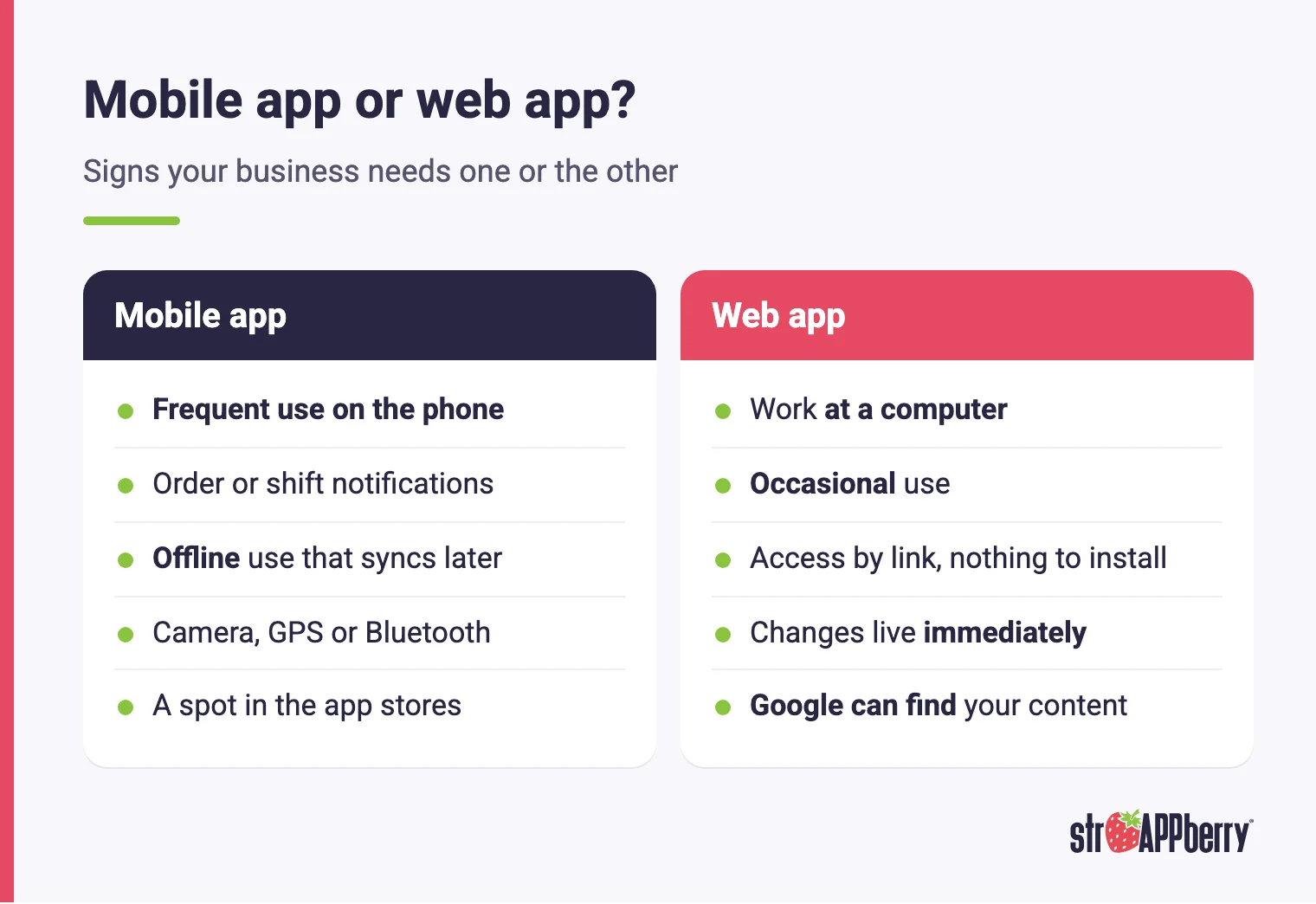
Mobile app vs web app for business? A mobile app makes sense when people will open it often on their phones, or when you need push notifications, offline use or device features like the camera. A web app makes sense when people work on computers, or when you want Google to find your content.
What is the difference between a mobile app and a web app?
A mobile app is installed on the phone from the App Store or Google Play. It lives on the device, shows up as an icon on the home screen and can use the phone's hardware: camera, GPS, Bluetooth, notifications and local storage. Every new version goes through store review and reaches users when they update. A web app, on the other hand, opens in a browser from a URL, on a computer or a phone, with nothing to install. It might be a customer portal, an admin dashboard, an inventory system or an internal platform. When you ship a change, every user sees it right away, with no store in the middle. The real difference isn't technical. It's about usage: where the person is when they need it, how often they open it and what they need to get done. So the useful question isn't which one is better. It's what your users do, and on which device they do it.
When does a mobile app make sense?
An app earns its place when the phone is where the work or the purchase happens. Think of customers who order, book or pay often and like having your brand one tap away, or field staff who take orders on their route, log deliveries, count inventory or take photos as proof of service. It also fits when you need push notifications for an order update or a shift reminder, when work has to continue without a signal and sync later, or when you depend on hardware, like scanning barcodes with the camera, tracking routes with GPS or pairing Bluetooth devices. Being listed on the App Store and Google Play also brings a kind of discovery and trust some customers expect. The trade-off is that you have to convince people to install it, ship every release through two stores and keep up with yearly iOS and Android changes. If your users would open it once a month, it probably isn't worth that effort.
When does a web app make sense?
A web app is usually the better choice when your users sit at a computer or only need the tool occasionally. Admin dashboards, invoicing systems, reporting tools, internal CRMs and portals where a customer checks an account balance now and then rarely justify a native app. The biggest advantage is reach: anyone with a browser gets in through a link, with nothing to install, from Windows, Mac, Android or iPhone. You release whenever you want, without waiting on store review, and everyone is always on the same version. Search is the other advantage. Google finds web pages with crawlers, analyzes them, stores them in its index and shows them when someone searches for something relevant. If part of your goal is for new customers to find you, your public content needs to live on the web. The limit is hardware: a browser gives you narrower access to phone features than an installed app does.
How do a mobile app, a web app and a PWA compare?
| Criteria | Mobile app | Web app | PWA (progressive web app) |
|---|---|---|---|
| How people get it | Installed from the store | Opened from a link in the browser | Opened in a browser, and can be installed |
| Reach | People who install it | Anyone with a browser | Anyone with a browser |
| Offline use | Yes, if designed for it | Usually needs a connection | Possible with service workers |
| Device features | Broad hardware access | Limited to the browser | Limited to the browser |
| Push notifications | Yes | Depends on the browser | Only on the Home Screen (iOS 16.4+) |
| Shipping changes | Each store's review | Immediate | Immediate |
| Google Search | Doesn't replace a website | Public pages indexable | Public pages indexable |
Can a PWA replace a native app?
Sometimes. A progressive web app, or PWA, is built with web technologies but delivers an experience close to an installed app. According to MDN, like a website it runs on multiple platforms and devices from a single codebase, and like a platform-specific app it can be installed on the device and launched from the operating system. With service workers, it can also keep working offline or on a spotty connection. That makes a PWA a good fit for catalogs, ordering or customer portals you want people to keep handy without going through the app stores. Its limits come from the browser. On iPhone and iPad, web push notifications arrived with iOS and iPadOS 16.4, and they only work once the user adds the web app to the Home Screen. Some hardware features aren't available in every browser either: MDN lists the Web Bluetooth API as experimental with limited availability. If your operation depends on features like that, an installed app is still the safer bet.
Can you publish your website as an app on the stores?
Not without adding real value. Apple's App Store Review Guidelines say in rule 4.2, on minimum functionality, that an app should include features, content and UI that elevate it beyond a repackaged website, and that if it isn't particularly useful, unique or "app-like," it doesn't belong on the App Store. Rule 4.2.2 adds that, other than catalogs, apps shouldn't primarily be marketing materials, ads, web clippings, content aggregators or a collection of links. In practice, dropping your site into an empty app shell tends to end in rejection, and it gives people a worse experience than the browser would. If you want a spot in the stores, the app should do something the web can't do as well, such as offline use, useful notifications, camera-based scanning or fast access to frequent tasks. If none of that applies, it's a sign that a web app or a PWA is the better fit for your business.
What does maintaining each option involve?
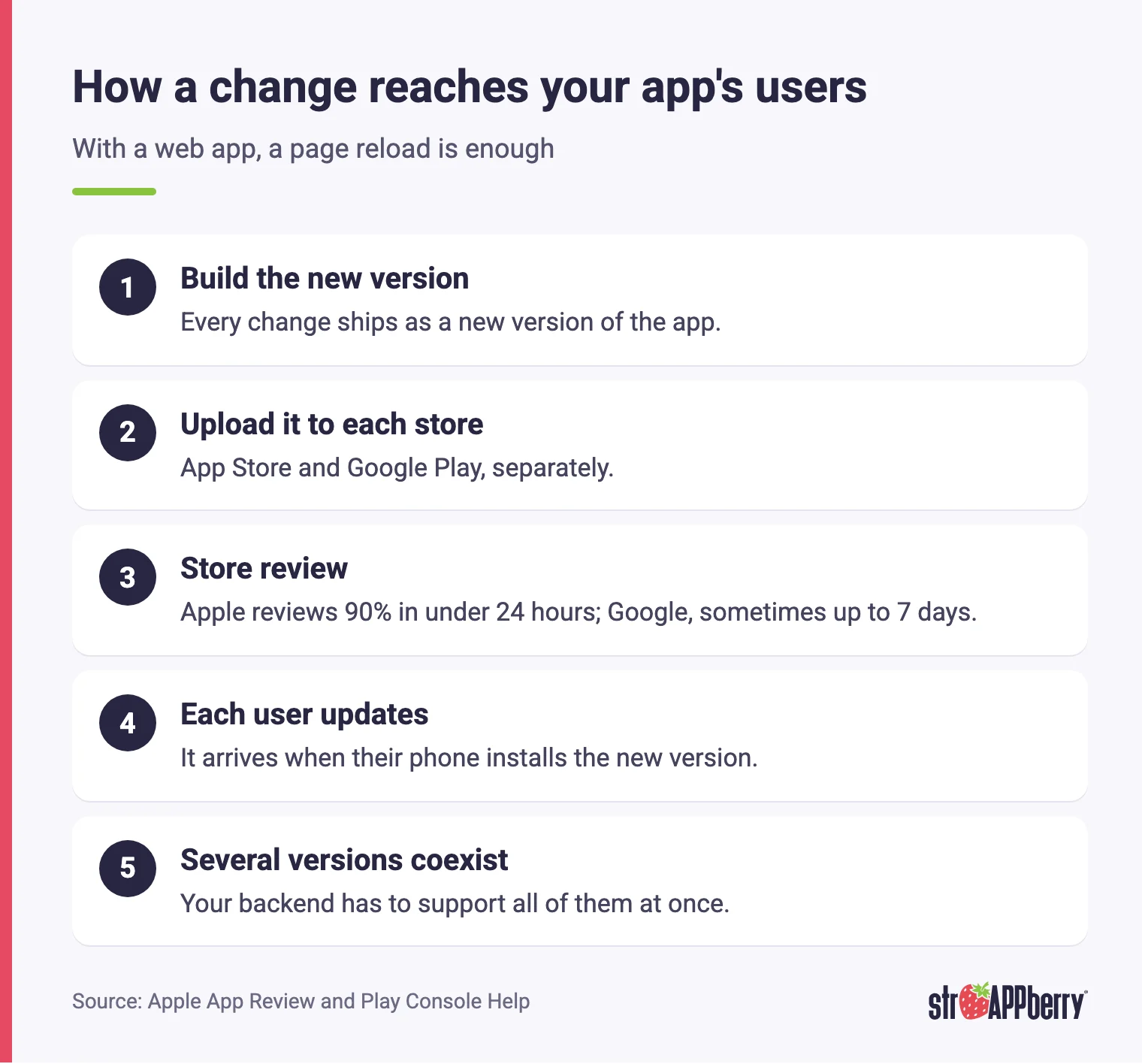
Both options need maintenance, just in different ways. With an app, every change gets built, uploaded to the store and reviewed. Apple says that on average 90% of submissions are reviewed in less than 24 hours, and Google notes that some apps go through extended reviews of up to seven days, or longer in exceptional cases. After that, each user gets the new version whenever their phone installs it, so several versions run at the same time and your backend has to support all of them. On top of that come yearly iOS and Android releases and new store requirements. With a web app, you ship a fix and everyone sees it on their next page load, but you need to test across the browsers and screen sizes your customers use, and keep the server fast and secure. If you run both an app and a web app, the most efficient setup is a shared backend, so your business rules live in one place instead of two.
How do you decide what your business needs?
Work through these questions with your team:
- Will people do this task on a phone, a computer or both?
- How often will they use it: several times a day, weekly or once in a while?
- Do you need the camera, GPS, Bluetooth, push notifications or offline work?
- Does it matter that new customers can find you on Google?
- Is being on the App Store or Google Play part of your value proposition?
- Who will ship changes and maintain it after launch?
If most answers point to computers and occasional use, start with a web app. If they point to phones, daily use and hardware, start with a mobile app. At Strappberry we build custom web systems, iOS and Android apps, native or cross-platform, and the integrations that connect them, and we build the MVP in 2 months. Explore our custom software development services or tell us about your project.
Sources
Related articles

App development
Native vs cross-platform app: which is right for your business?
A native app gets the most out of each platform; a cross-platform app shares code between iOS and Android. Here is how to choose for your case.
· Equipo Strappberry

App development
What Does Proof of Delivery Mean in Logistics?
Proof of delivery is the evidence that a shipment reached the right person at the right place and time. This guide explains what belongs in a POD record, why thin documentation turns into unpaid invoices and lost claims, and how to capture signatures, photos and GPS data that hold up weeks later.
· Equipo Strappberry

App development
Website Down Message to Customers: Templates That Work
When your site goes dark, the outage itself is rarely what costs you the customer — the silence is. This guide gives operations and IT leads a framework for writing an outage notice, copy-ready templates for status pages, email, SMS and support macros, and the technical setup that lets the message
· Equipo Strappberry